












First Come First Serve
FCFS stand for First Come First Serve. In this method, simplest scheduling algorithm assign CPU to the process which arrive first. It means that it is the simplest CPU scheduling algorithm. It can be easily understand and can easily implemented using the data structure. It means that FCFS uses a Queue Data Structure to manage processes. It follows the First In First Out (FIFO) principle. The process that arrives first gets the CPU first. FCFS always the non preemptive nature.
FCFS uses a queue data structure.
Advantages of FCFS
- FCFS are easy to use.
- It is easy to understand.
- It is easy to implement.
- It should be used for background process where execution is not urgent.
Disadvantages of FCFS
- It suffers from convoy effect. Convoy effect means that it occurs when short processes have to wait for a long process to complete its execution.
- In FCFS normally, higher average waiting time.
- FCFS does not consider the priority or seniority.
- It should not be used for interactive system.
Easy Example
Suppose there are three processes P1, P2, and P3 waiting for the CPU. They arrive in order P1, P2, and P3. We know that FCFS follows the First In First Out (FIFO) principle. Therefore, P1 gets the CPU first because it arrives first. After P1 completes it its execution, P2 gets the CPU, and then P3.
Execution Order: P1 → P2 → P3
Example with Table and Gannt Chart
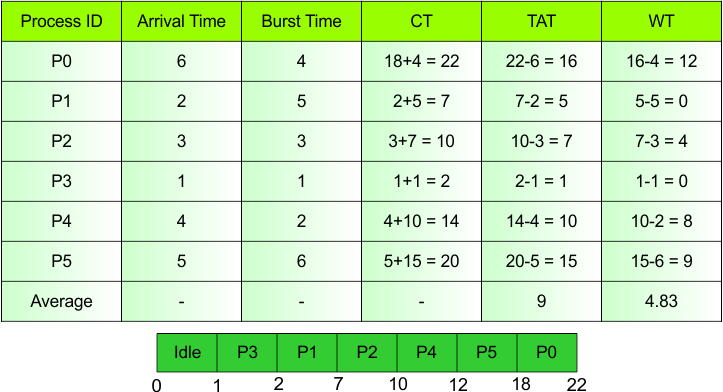
We can easily understand the FCFS with the help of table and Gannt chart.
Explanation
In table show the different kinds of CPU Scheduling Parameters. First one is Process id, second is Arrival Time, and up so on in the last is Waiting Time (WT). So, each CPU Scheduling Parameters explanation as given below.
Process ID
Process is a program that is currently running or ready to run. Each process has a unique ID for identification. In this table six processes are as given.
- Example: P1
Arrival Time
The time at which a process enters a ready queue.
- Example: P1 → 2
Burst Time
Burst time is the time who is needs to execute on the CPU for the process.
- Example: P1 has a 5 Burst Time. It means that P1 needs to 5 units CPU to complete his own work.
Completion Time (CT)
CT stand for Completion Time. It means that it is calculated by adding Arrival Time (AT) to Turnaround Time (TAT).
- Formula
CT = Arrival Time (AT) + Turnaround Time (TAT)
- Example: P1
Arrival Time = 2
Turnaround Time = 5
CT = Arrival Time (AT) + Turnaround Time (TAT)
- CT = 2+5 = 7
Turnaround Time (TAT)
When process enter the ready queue and complete than time of completion and ready queue is known as TAT.
- Formula
TAT = Completion Time – Arrival Time
- Example: P1
Arrival Time = 2
Completion Time = 7
TAT = Completion Time – Arrival Time
- TAT = 7-2 = 5
Waiting Time (WT)
In waiting time subtracting burst time from turnaround time is called waiting time.
- Formula
WT = Turnaround Time – Burst Time
- Example: P2
Turnaround Time = 7
Burst Time = 3
WT = Turnaround Time – Burst Time
- WT = 7-3 = 4
| Note: P2 waited 4 time units to get the CPU. |
Average Turnaround Time (ATAT)
Average Turnaround Time (ATAT) is the average time taken by all processes to complete their execution.
- Formula
Average TAT = Sum of Turnaround Times / Total No of Processes
Sum of Turnaround Times = 16 + 5 + 7 + 1 + 10 + 15
Total No of Processes = 6
Average TAT = Sum of Waiting Times / Total No of Processes
ATAT = (16 + 5 + 7 + 1 + 10 + 15 ) / 6
ATAT = 54 / 6
- ATAT = 9 units
Average Waiting Time (AWT)
Average Waiting Time (AWT) is the average time that all processes spend waiting in the ready queue.
- Formula
Average WT = Sum of Waiting Times / Total No of Processes
Sum of Waiting Times = 12 + 0 + 4 + 0 + 6 + 7
Total No of Processes = 6
AWT = (12 + 0 + 4 + 0 + 6 + 7) / 6
AWT = 29 / 6
- AWT = 4.83 ms
Gantt Chart
A Gantt chart is a diagram that shows the order and execution time of processes on the CPU.
Gantt Chart Explanation
- Idle: Executes or runs from 0 to 1.
- P3: Executes from 1 to 2.
- P1: Executes from 2 to 7.
- P2: Executes from 7 to 10.
- P4: Executes from 10 to 12.
- P5: Executes from 12 to 18.
- P0: Executes from 18 to 22.
Execution Order: Idle → P3 → P1→ P2 → P4 → P5 → P0