
Memory Hierarchy
The memory hierarchy in a computer system refers to different levels of memory storage with varying capacity, speed and cost. The memory hierarchy is designed to provide the CPU with fast access to data and a large storage area for longer-term data. The levels of the memory hierarchy, in order of speed, are:
Registers: Fastest and smallest memory built into the CPU.
Cache Memory: Cache memory is small memory, fast memory built into the CPU and used for the frequently accessed data.
Random Access Memory (RAM): It is random access memory. It means that it store data temporarily. In data and instruction RAM is faster than storage devices or secondary memory.
Secondary Memory ( Storage Devices): Secondary memory is used for permanent storage. It is slower than RAM but with larger capacity.
Memory Hierarchy Diagram
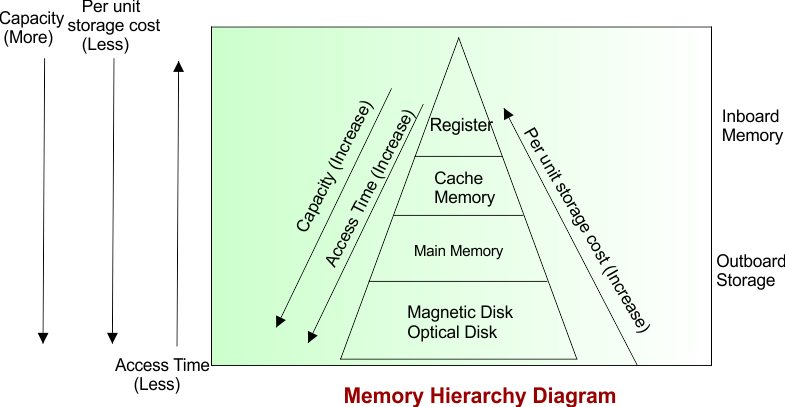
Explanation
The memory hierarchy diagram shows different types of computer memory. In this diagram shows that registers are at the top, followed by cache memory, Main Memory and Secondary Storage. As we move top to bottom, storage capacity access time increase, while speed and cost per unit of storage decrease. It means that in easy words we can say that Fast memory is usually more expensive and has less storage capacity. Slow memory is usually cheaper and has more storage memory.
How CPU uses Memory Hierarchy
If we want this hierarchy to work fine, then most of the time when CPU needs a data it must be present in Cache, if not possible main memory, worst case Secondary memory.
But this is a difficult task to do on your computer as it has 1 TB of Secondary Memory, 16 GB of main memory, but only 768KB, 4MB, 16MB of L1, L2, L3 cache respectively.
If someone we can estimate what data CPU will require in future we can prefetch in Cache and Main Memory.
Locality of reference helps we to perform this estimation.
Locality of Reference
Locality of reference refers to the tendency for a program to access a small portion of its memory. At any given time, while the vast majority of its memory remains unused. There are two type of locality reference as given below.
Temporal Locality
Spatial Locality
i) Temporal Locality
Temporal locality refers to the tendency for a program to access recently used memory locations repeatedly. It means that in easy words we can say that if a program accesses a memory location, it is likely to access that same location again in the near future.
ii) Spatial Locality
Spatial locality refers to the tendency for a program to access memory locations that are close to each other in memory. It means that in easy words we can say that if a program accesses a memory location, it is likely to access other nearby memory locations soon after.
Importance of Memory in Computer
Memory is one of the most crucial components of a computer. Some reasons why memory plays a vital role in computer ‘s overall performance.
Storage of Data: Memory allows the processor to access the data quickly.
Multitasking: Memory enables multiple tasks simultaneously, as it allows the processor switch between different programs and data efficiently.
Running Application: Applications and programs require a certain amount of memory.
Operating System: The operating system also requires memory to run smoothly.
| Memory is critical for the efficient operation of a computer and performance role in determining its performance. |
The criteria for a ideal memory in a computer system depend on the specific requirements of the system, but there are several general factors that are important for any type of memory.
Speed
Capacity
Stability
Cost
Scalability
A good memory in a computer system should provide a balance of all factors written above, depending on the specific requirements of the system.