












Round Robin
Round Robin is also designed for time sharing systems. In this system, it is not necessary to complete one process and before starting another. The main purpose is provide to a quick responsive and divide time of the CPU among the process in the ready state. So ready queue will be treated as circular queue. We fix a time quantum up to which a process can hold the CPU in one go, with in which either a process terminate are process must release the CPU and reenter in the circular queue and wait for a next chance. Each process gets fixed amount of CPU called a Time Quantum (TM). It means that in easy words we can say that If a process is not completed within this time quantum, the CPU stops that process and moves it to end of the ready queue. The CPU then selects the next process from the ready queue. This process is also continues until all processes are as completed. Round Robin is an important type of preemptive CPU scheduling. It is similar to the first come first serve FCFS with the Time Quantum.
| Note: Round Robin (RR) is always Pre-Emptive in nature. |
Advantages of Round Robin
- In Round Robin, the main advantage of perform best in the term of average response time.
- Each process to get the chance of the CPU.
- It works will in case of time sharing system, client server, architecture and interactive system.
- It is the kind of Shortest Job First (SJF) implementation.
Disadvantages of Round Robin
- In Round Robin, the main disadvantage is that longer process may take more time complete.
- The performance of Round Robin depends heavily on Time Quantum.
- It does not consider the process priority.
- A small Time Quantum increases context switching overhead.
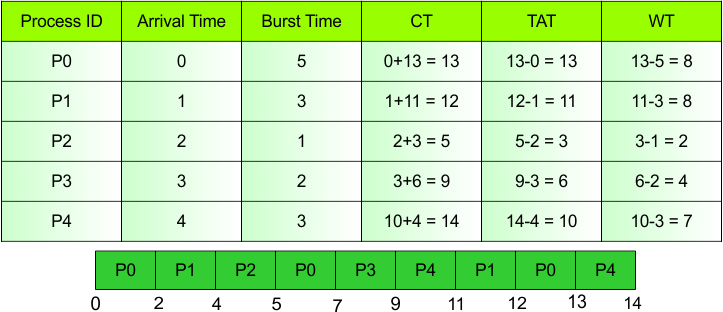
Example with Table and Gantt Chart
Explanation
The table shows the different kinds of CPU Scheduling Parameters. So, the more explanation of these parameters as given below.
Process ID
Process is a program that is currently running or ready to run. In this table five process are as given.
- Example: P1, P2, P3, P4,P5
Arrival Time
The time at which a process enters a ready queue is also known as Arrival Time.
- Example: P0 → 0
Burst Time
Burst time is the time who is needs to execute on the CPU for the process.
- Example: P1 is a 1 Burst Time. It means that P1 needs to only 1 time unit CPU to complete its execution.
Completion Time (CT)
CT stand for Completion Time. It means that it is calculated by adding Arrival Time (AT) to Turnaround Time (TAT).
Formula
CT = Arrival Time (AT) + Turnaround Time (TAT)
- Example: P0
Arrival Time = 0
Turnaround Time = 13
CT = Arrival Time (AT) + Turnaround Time (TAT)
CT = 0+13 = 13
Turnaround Time (TAT)
When process enter the ready queue and complete than time of completion and ready queue is known as TAT.
Formula
TAT = Completion Time – Arrival Time
- Example: P0
Arrival Time = 0
Completion Time = 13
TAT = Completion Time – Arrival Time
TAT = 13-0 = 13
Waiting Time (WT)
In waiting time subtracting burst time from turnaround time is called waiting time.
Formula
WT = Turnaround Time – Burst Time
- Example: P0
Turnaround Time = 13
Burst Time = 5
WT = Turnaround Time – Burst Time
WT = 13-5 = 8
| Note: P0 waited 8 time units to get the CPU. |
Gantt Chart
A Gantt chart is a diagram that shows the order and execution time of processes on the CPU.
Gantt Chart Explanation
- P0: Executes or runs from 0 to 2.
- P1: Executes from 2 to 4.
- P2: Executes from 4 to 5.
- P0: Executes from 5 to 7.
- P3: Executes from 7 to 9.
- P4: Executes from 9 to 11.
- P1: Executes from 11 to 12.
- P0: Executes from 12 to 13.
- P4: Executes from 13 to 14.
| Note: In this Gantt chart, some processes executes more than once because the CPU switches between processes. |