













Shortest Remaining Job First
SRJF stand for Shortest Remaining Job First ( SRJF). In Shortest Remaining Job First if a new process arrives with a shorter CPU burst time than the remaining time of the currently running process, the CPU switches to the new process. It means that in easy words we can say that in SRJF if a new process comes with less execution time than the OS stops current process and gives the CPU to the new process. The stopped process goes back to the ready queue and waits for it next turn. It means that when the CPU becomes available, the OS selects the process with shortest remaining time. Shortest Remaining Job First is also called Shortest Remaining Time First and also known as Shortest Remaining Time (SRT). SRJF is a type of pre-emptive scheduling. It helps to complete shorter processes first and quickly. So, reduce the average waiting time. In SRJF the longer processes may wait longer because the CPU gives the shorter processes first. If a short processes arrives than long processes face the issue of starvation. Starvation means that when a processes wait for a long time to get the CPU because the other processes keep getting the CPU first. Other processes mean short processes.
| Note: SRJF reduces the waiting time for short processes, but long processes may face starvation. |
Advantages of SRJF
- SRJF is a less waiting time than first come first serve (FCFS) and shortest job first (SJF).
- It provide good response time for short processes.
- It helps the avoid convoy effect.
- It helps reduce the average turnaround time
Disadvantages of SRJF
- It is a difficult to estimate remaining CPU time, need to complete the execution.
- It may provide poor response time for a long burst time process.
- Starvation is possible for a long processes or long processes may face starvation.
- In may cause more context switching overhead.
Easy Example
Suppose that three processes P1, P2 and P3 are waiting for the CPU. Their burst time are 8, 4 and 2, respectively. All processes arrive at time 0. We know that in SRJF, the process with the shortest remaining burst time gets the CPU first. So, P3 gets the CPU first because it has the shortest burst time. After P3, P2 gets the CPU and then P1.
| Note: Execution Order: P3 → P2 → P1 |
Example with Table and Gantt Chart
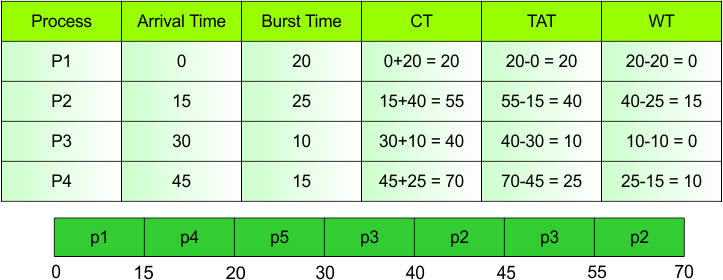
Explanation
In table show the different kinds of CPU Scheduling Parameters. So, the more explanation of these parameters as given below.
Process
Process is a program that is currently running or ready to run. In this table four process are as given.
- Example: P1, P2, P3, P4
Arrival Time
The time at which a process enters a ready queue is also known as Arrival Time.
- Example: P1 → 0
Burst Time
Burst time is the time who is needs to execute on the CPU for the process.
- Example: P1 is a 20 Burst Time. It means that P1 needs to 20 time units CPU to complete its execution.
Completion Time (CT)
CT stand for Completion Time. It means that it is calculated by adding Arrival Time (AT) to Turnaround Time (TAT).
- Formula
CT = Arrival Time (AT) + Turnaround Time (TAT)
- Example: P1
Arrival Time = 0
Turnaround Time = 20
CT = Arrival Time (AT) + Turnaround Time (TAT)
- CT = 0+20 = 20
Turnaround Time (TAT)
When process enter the ready queue and complete than time of completion and ready queue is known as TAT.
- Formula
TAT = Completion Time – Arrival Time
- Example: P1
Arrival Time = 0
Completion Time = 20
TAT = Completion Time – Arrival Time
- TAT = 20-0 = 20
Waiting Time (WT)
In waiting time subtracting burst time from turnaround time is called waiting time.
- Formula
WT = Turnaround Time – Burst Time
- Example: P2
Turnaround Time = 40
Burst Time = 25
WT = Turnaround Time – Burst Time
- WT = 40-25 = 15
| Note: P2 waited 15 time units to get the CPU. |
Gantt Chart
A Gantt chart is a diagram that shows the order and execution time of processes on the CPU.
Gantt Chart Explanation
- P1: Executes or runs from 0 to 15.
- P4: Executes from 15 to 20.
- P5: Executes from 20 to 30.
- P3: Executes from 30 to 40.
- P2: Executes from 40 to 45.
- P3: Executes from 45 to 55.
- P2: Executes from 55 to 70.
| Note: In this Gantt chart, some processes execute or runs more than once because the CPU switches between processes. |