













Priority Scheduling
Priority Scheduling is Pre-Emptive or Non Pre-Emptive Scheduling. In Priority Scheduling, a priority is associated with each process and the CPU is allocated to the process with the highest priority. It means that every process has a one priority. If both processes are priority are equal then the process that arrives first gets the CPU firsts ((FCFS). Priority can be represented by number and lower number have higher priority. All ready process enters in ready queue and CPU selects a process according to its priority. It means that the CPU selects process with the highest priority and execute it. Tie is broken using first come first serve (FCFS) order. It means that if two priority are same than, we use the method of FCFS. No importance to arrival time and burst time. Priority scheduling support the both version of preemptive and non preemptive.
| Note: Priority scheduling may be pre-emptive or non pre-emptive scheduling. |
Advantages of Priority Scheduling
- Priority scheduling provides a facilities specially for the system process.
- It allows to run important process first even it is a user process.
- It helps the CPU run high priority processes first.
- It runs important first and less important later.
Disadvantages of Priority Scheduling
- Process with the smaller priority may starvation from the CPU. Starvation mean low priority process may wait for a long time is called starvation.
- No idea of response time or waiting time.
- High priority processes run fast so, low priority processes must be a wait.
- It is difficult to give a right priority to every process.
Easy Example
Suppose that there are three processes P1, P2, and P3 are a waiting for the CPU. there priorities are 1, 4 and 2 respectively. We know that a lower number has a higher priority. Therefore, P1 gets the CPU first because it has a higher priority. After P1, P3 gets the CPU and then P2.
| Note: Execution Order: P1 → P3 → P2 |
Example with Table and Gannt Chart
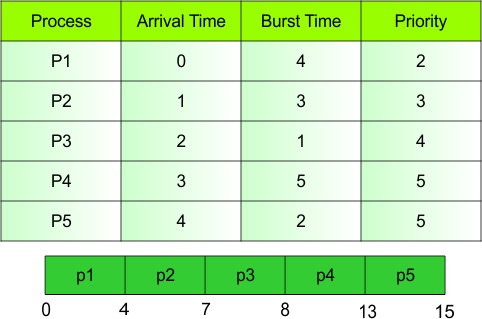
We can easily understand the priority scheduling with the help of table and Gannt chart.
Explanation
In table show the different kinds of CPU Scheduling Parameters. First one is Process id, second is Arrival Time, second last is Burst Time and last one is Priority . So each CPU Scheduling Parameters explanation as given below.
Process
Process is a program that is currently running or ready to run. In this table five process are as given.
- Example: P1, P2, P3, P4, P5
Arrival Time
The time at which a process enters a ready queue.
- Example: P1 → 0
Burst Time
Burst time is the time who is needs to execute on the CPU for the process.
- Example: P1 is a 4 Burst Time. It means that P1 needs to 4 units CPU to complete his own work.
Priority
Priority is show the importance of the process. It means that priority tells us which process is execute the first.
- Example: P1 → Priority 2
Gantt Chart
A Gantt chart is a diagram that show the order and execution on the CPU.
Order of Gantt Chart
- P1 → P2 → P3 → P4 → P5
More explanation of Gantt Chart
- P1 runs from 0 to 4.
- P2 runs from 4 to 7.
- P3 runs from 7 to 8.
- P4 runs from 8 to 13.
- P5 runs from 13 to 15.