





Introduction to Operating System
Operating System is also known as OS. Operating System is a system software. It acts as an intermediator between the hardware and the user. It acts because we use the hardware convenient and more efficient. Operating System is also known as Source Manager. It manage the system resources in an unbiased fashion both hardware and software. Direct access of operating system are not easy. It provides a platform on which other application programs are installed. There are many examples of operating system such as Windows, macos, Linux, Android, iOS, ChromeOS and Unix.
Abstract view of system
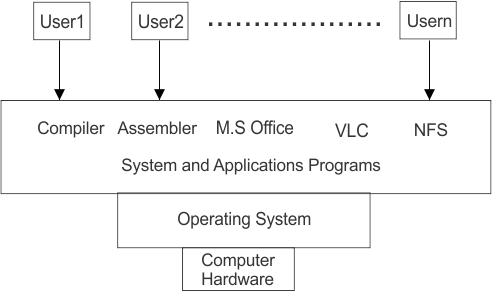
Explanation
Computer Hardware is the base of abstract view of the system. Direct access of applications are not easy because the operating system controls it completely. The operating system manages the complier and assembler. Complier and assembler are also called system software. M.S office and VLC media player are also known as applications. All application programs communicate with the operating system. No application program can directly communicate with the hardware. We use this management because hardware can be used easily or properly and all applications can work together. Applications program cannot work directly with computer hardware. When a user wants to do something the user gives instructions through an application program. For example a user wants to play the movie they open VLC media player and press the play button. VLC communicate with the operating system and tells it to play the movie. The operating system controls the computer hardware and allows the movie to play.
Basic Elements
There are four important basic elements of Operating System (OS).
i) Central Processing Unit (CPU)
ii) Main memory
iii) I/O module
iv) System bus
1. Central Processing Unit (CPU)
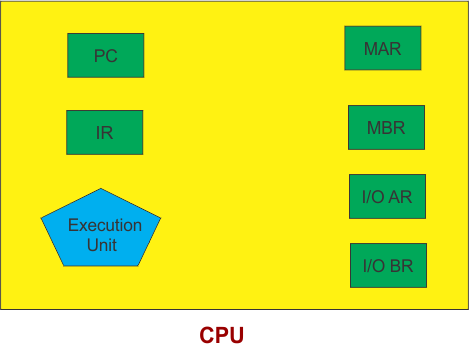
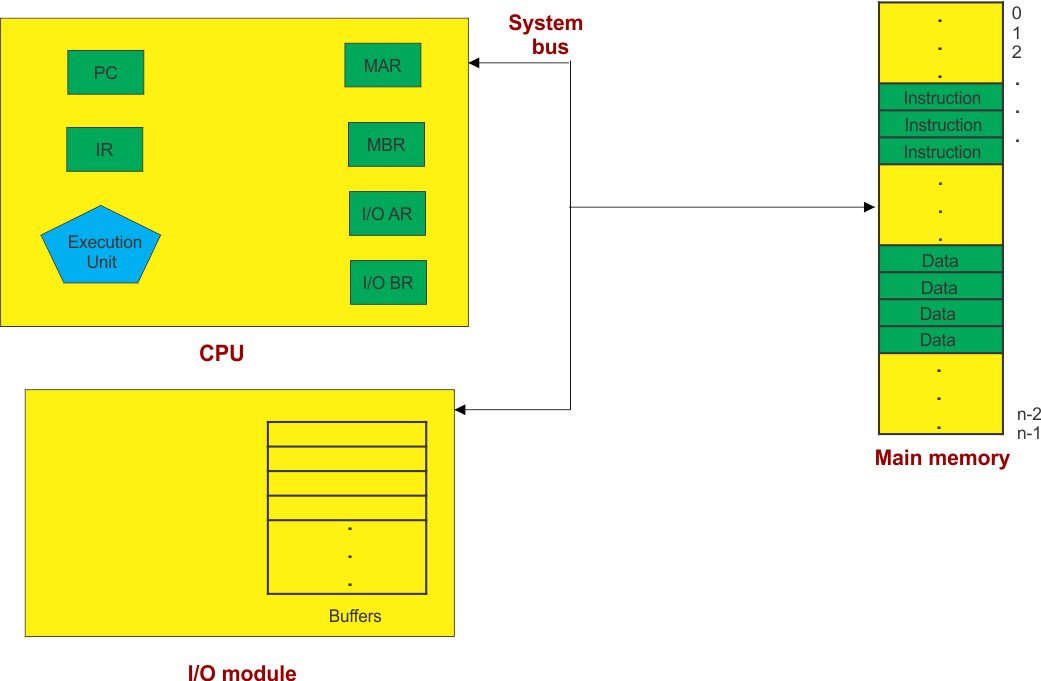
CPU stand for Central Processing Unit. It is the basic elements of the operating system. CPU is the main part of the computer that processes instructions. It means that CPU takes instructions, processes them, and produced the required result. It is also called brain of the computer.
Hence, the diagram of the CPU are as given.
2. Main memory
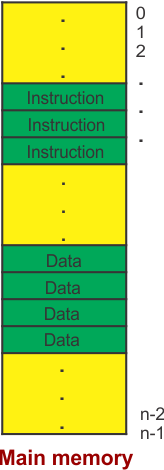
Main memory is the second basic element of the operating system. It is the main part of the computer that stores data and instructions temporarily while computer is working. It helps the CPU that quickly access to information. Register are located on main memory. Register are smallest and fastest unit of memory storage.
Hence, the diagram of the Main memory are as given.
3. I/O module
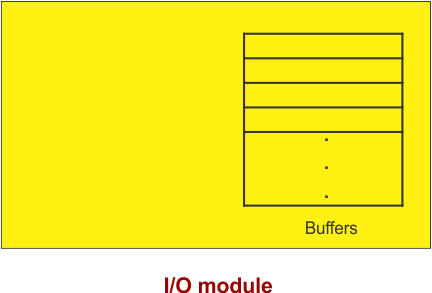
I/O module stand for Input or Output module. It is also basic elements of the operating system. It is a part of the computer that helps the CPU communicate with input and output devices. It means that in easy words we can say that the I/O module acts as a bridge between the CPU and input or output devices.
Hence, the diagram of the I/O module are as given.
4. System bus
System bus is the last basic elements of the operating system. System bus is the communication path hat connects the CPU, main memory and I/O devices. It allows these components to exchange data and instructions. It means that in easy words we can say that system bus is like a communication road.
Hence, the diagram of the System bus are as given.
Goals of Operating System
There are many goals of operating system. But we can discuss only two important goals of operating system.
i) Primary Goal
ii) Secondary Goal
1. Primary Goal
Primary goal is the convenience and user friendly. It means that to make a computer easy and comfortable. It is mostly used in computers and mobile phone that we use every day.
2. Secondary Goal
Secondary goal is the efficiency. It means that use the CPU, memory, storage and I/O devices efficiency. It is mostly used in large systems such as servers and mainframes.
Functions of Operating System
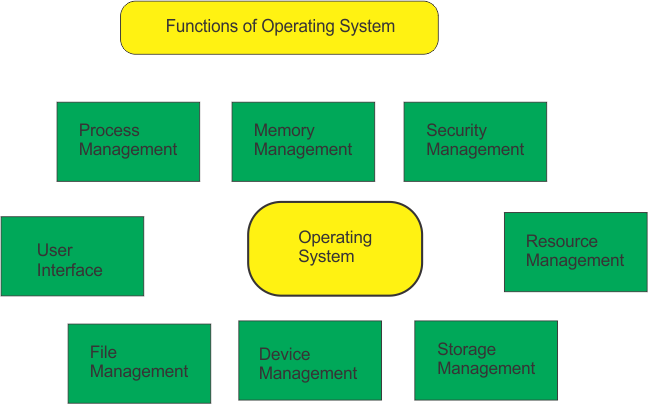
Hence, there are eight most important functions of operating system are as given or follow.
i) Process Management
ii) Memory Management
iii) Security or Privacy Management
iv) Resource Management
v) Storage Management
vi) Device Management
vii) File Management
viii) User Interface
1. Process Management
Process management manage the process main memory to CPU or terminate the process. Process load main memory to CPU is called CPU Scheduling. Create and delete of user or system process.
Types of Processes
i) Operating System Processes
Operating System Processes execute system code
ii) User Processes
While user processes execute user code.
2. Memory Management
Memory Management manage the memory space of main memory. It allocate and deallocate the memory space of main memory. De-allocates the memory when a process no longer needs it. Memory distribution while processing.
Types of Memory Allocation
i) Fixed Size Partition Allocation
In this type of memory allocation, equal memory is provided to each process.
ii) Variable Size Partition Allocation
In this type of memory allocation, space in main memory is allocated strictly according to the need of process.
3.Security or Privacy Management
Security or Privacy Management provide privacy so that unauthorized application can not access the data such as window uses Kerberos authentication.
4. Resource Management
Resource management manage the measure like hardware or software. For example if multiple user accessing the system. So, resource management has responsibility to provide hardware to the user.
5. Storage Management
Storage management provide the logical view of information storage. Storage management abstracts from the physical properties.
6. Device Management
An operating system manages device communication using the their respective drivers. Keep records of all devices attached to computer. Allocate the device in the efficient way.
7. File Management
In file management all data and information available in the computer are sorted permanently in the computer memory. A file is a container in the computer system. In file management we create and delete the file.
8. User Interface
User Interface is the most important workspace of the OS, with the help of user interface operating system provides the necessary commands to the user to use the hardware of the computer system.